Installation issues with the latest version!

Next Topic
 
classic Classic list List threaded Threaded
7 messages Options
Reply | Threaded
Open this post in threaded view
|

Installation issues with the latest version!

H.U.Akay
Two Questions:

1 ) Which version of MATLAB does the latest version of FEATool work with?  GUI seems to freeze in the middle of simulations -- both in Linux and Matlab.

2) Having to use the latest version is always a hassle.  Why can't we use an older version if we are happy with it?

Thanks for your help in advance.
Reply | Threaded
Open this post in threaded view
|

Re: Installation issues with the latest version!

Precise Simulation
Administrator
H.U.Akay wrote
1 ) Which version of MATLAB does the latest version of FEATool work with?  GUI seems to freeze in the middle of simulations -- both in Linux and Matlab.
This should not really happen as FEATool Multiphysics should support Matlab versions 2009b and later.

Could you supply more information about your system for troubleshooting purposes, for example pasting the information from selecting "System Info..." from the "Help" menu in the FEATool toolbox GUI.
Reply | Threaded
Open this post in threaded view
|

Re: Installation issues with the latest version!

Precise Simulation
Administrator
In reply to this post by H.U.Akay
H.U.Akay wrote
2) Having to use the latest version is always a hassle.  Why can't we use an older version if we are happy with it?
Yes, with a valid (paid) license you can use any version (older versions are always available from https://github.com/precise-simulation/featool-multiphysics/releases). We have had to restrict free users from using releases older than 1-year to limit our technical support costs in this area, sorry for the inconvenience and hope you can understand this.
Reply | Threaded
Open this post in threaded view
|

Re: Installation issues with the latest version!

H.U.Akay
Thank you, I think I resolved the freezing problem, by being more careful.  On the other hand, I have another issue with the Euler-Bernoulli Beam problem. The post processor allows plot of the displacements only, not slope and bending moment.  This may be an issue with 1D problems only in the version 1.18.0 of FEATool, because in the older versions I could get all those plots.  As a half-way solution I can get slope and moment values from point/line evaluations menu of the post-processor OK, but do not know how to export those to a an Excel or Matlab file for plotting.  I will appreciate it if you can offer help me with this issue.  Thanks...
Reply | Threaded
Open this post in threaded view
|

Re: Installation issues with the latest version!

Precise Simulation
Administrator
H.U.Akay wrote
Thank you, I think I resolved the freezing problem, by being more careful.
It is good that you managed to work around the issue for yourself. However, without reporting how or what the issue is, with steps to reproduce, we cannot diagnose and possibly fix this for the future, and other users facing similar issues cannot be helped either. So if you do report an issue in the future, please report full instructions how to reproduce it if possible.
Reply | Threaded
Open this post in threaded view
|

Re: Installation issues with the latest version!

Precise Simulation
Administrator
In reply to this post by H.U.Akay
H.U.Akay wrote
I have another issue with the Euler-Bernoulli Beam problem. The post processor allows plot of the displacements only, not slope and bending moment.  This may be an issue with 1D problems only in the version 1.18.0 of FEATool, because in the older versions I could get all those plots.
If possible, open new threads for new issues in the future. This seems to be a bug with the new GUI for some 1D models, for which there will be a fix in the next release/update.
Reply | Threaded
Open this post in threaded view
|

Re: Installation issues with the latest version!

Precise Simulation
Administrator
This post was updated on .
In reply to this post by H.U.Akay
H.U.Akay wrote
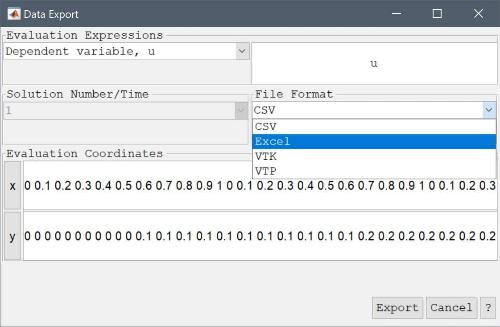
I can get slope and moment values from point/line evaluations menu of the post-processor OK, but do not know how to export those to a an Excel or Matlab file for plotting.  I will appreciate it if you can offer help me with this issue.
Users with a full (paid) license can directly use the "Export Data..." > "CSV/Excel Format..." option in the "Post" menu of the FEATool Multiphysics GUI, see also: https://featool.com/doc/post#postex

featool multiphysics - data export